OK, I have my Zero-W configured with diet-pi, ProFTP and MotionEye, and I have a camera attached. I can see the cam image just fine when I connect to the MotionEye software using its web interface. I guess at this point my only questions are...
Are there any MotionEye settings I need to be concerned with? (Turning on/off Still Images, Movies, etc.)
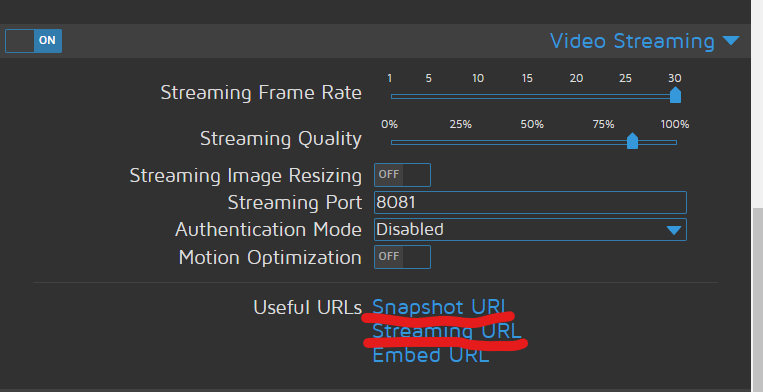
and what do I use for a URL on Octoprint to get the MotionEye images? That part isn't obvious to me.
I know you don't want to use Octolapse, but in case anyone else reading this is interested you could disable stabilizations (set x and y axis stabilization to disabled ) in the 'Stabilization Profile'. I'd also disable - 'lift before move' in the snapshot settings, and make sure 'retract before move' is enabled in the snapshot settings. That would give you a very low quality impact 'octoprint' style timelapse. However, you still might have issues if your 'Printer Profile' octolapse settings don't match your slicer settings due to the way Octolapse calculates and detects retraction.
On the MotionEye camera settings ensure that Streaming is enabled and then you use the Snapshot URL link and Streaming URL link it supplies. You can just click those links in the screenshot below and then copy/paste the links into OctoPrint's settings.
Actually, it's not that I don't WANT to use Octolapse. I actually wish I could, since it does make a really cool video. It just seemed to be far too complicated to configure properly, so there was minimal impact to printing as well as keeping the video quality. It's too bad the plug-in can't 'auto-configure' based on the gcode somehow. But I'm sure that would be a monumental, if not impossible task.
Tell me about it, lol! The version you are using is more like a slicer in terms of config. I actually do have an 'automatic configuration' for the slicer settings, as you suggest, in the new version (it was sort of monumental, but I'm glad it's done). I also eliminated the 'snapshot' profiles and combined them with the 'stabilization' profiles. I'm working on a semi-automatic printer configuration also, but that one will take a while. Keep your eyes peeled for the next release, and thanks for your input. I'm taking it all to heart.
I can only imagine. I haven't figured out a good way to do configuration migrations even, I can't fathom keeping it all straight for so many plugins! Thank you so much for all of your efforts!
Personally, I would encourage plugin authors to create two versions: the free one and the awesome one. Give the free one away and charge for the awesome one. At least then you'd have some form of money coming back to you. IMHO, some of these are too good to give away for free and to support for free. By your own admission, it's sometimes too much work.
I call it the 80% rule: give away 80% of the functionality and charge for the version which includes the other 20%. The average person doesn't need the features of the "pro" version; those who do probably can afford to pay.
Perhaps this deserves its own threads. I am a strong believer in open-source, but at some point I might have to stop supporting my plugin due to the sheer amount of effort involved. I have my good days and my bad days.
It's tough spending 10s of hours per week working on a project that actually ends up costing you money. I've got a handful of very awesome patrons, but so many people who do not contribute want/need support, which is very time consuming. I'd love to do this full-time, and to expand to other projects, and that requires cash unfortunately.
What would a 'premium' plugin look like? How would it work? If this is an interesting enough topic I'll create a separate thread.
Thanks for the support. I really thought this would be something that others would like to have as well.
I have been using the MotionEye option on a Pi Zero W, as discussed above now. And it actually works pretty well. You can't configure the timestamp format. (It simply adds the current time and date in the corner of the image.) But it is perfectly acceptable for hobby use. I have noticed some reduction in image quality over having the cam directly attached to the OctoPrint pi. Perhaps due to the lower power of the Pi Zero vs a Pi 3? But for my use, while not perfect, it was fast and acceptable.
I'm also going to go ahead and install OctoLapse again, and see what has changed since I tried using it last.
Well, I hate to ask (considering the recent discussions). But....
I did decide to go ahead and install OctoLapse again, to see what is new. But I'm still having heartburn over the config.
Your installation video is very helpful and informative. And IF I was using Slic3r Prusa Edition, my configure issues probably wouldn't exist since you spell out exactly how to find the numbers and how to change them. But, I'm using Cura. And I'll be darned if I can find half of the numbers that I'm supposed to fill into the config boxes.
Any guidance (NO rush), would be appreciated!
Thanks!
Only enter the settings that are required for cura, and forget about 'high quality mode' snapshot profile (this will likely be removed from the next version anyway). There is a * by all of these settings that are required.
OR, since you don't have any settings that you care about in Octolapse probably, you could try the pre-alpha version that can suck in all of your slicer config settings. I promise that there will be some setup issues (you'll probably need to restore the default profiles immediately after install, because I'm currently working on the settings migration) that we'll have to work through. Also, there is a small script you will need to place in your cura start or end gcode (but that's really easy).
PM me if you want to try the super duper pre-release. To quote Monte Python: If you do doubt your courage or your strength, come no further.