I see. And then i can use sio reaction to send gcode. I will look into it. Thanks for the recomendation
1 Like
Please share a system info bundle so we can evaluate for any errors.
perfect...underlying error...
2025-10-03 06:36:43,119 - octoprint.plugin - ERROR - Error while calling plugin physicalbutton
Traceback (most recent call last):
  File "/opt/octopi/oprint/lib/python3.11/site-packages/octoprint/plugin/__init__.py", line 285, in call_plugin
    result = getattr(plugin, method)(*args, **kwargs)
             ^^^^^^^^^^^^^^^^^^^^^^^^^^^^^^^^^^^^^^^^
  File "/opt/octopi/oprint/lib/python3.11/site-packages/octoprint/util/__init__.py", line 1692, in wrapper
    return f(*args, **kwargs)
           ^^^^^^^^^^^^^^^^^^
  File "/opt/octopi/oprint/lib/python3.11/site-packages/octoprint_physicalbutton/__init__.py", line 25, in on_after_startup
    setup_buttons()
  File "/opt/octopi/oprint/lib/python3.11/site-packages/octoprint_physicalbutton/lib/gpio_setup.py", line 18, in setup_buttons
    new_button = Button(button_gpio, pull_up=True, bounce_time=None)
                 ^^^^^^^^^^^^^^^^^^^^^^^^^^^^^^^^^^^^^^^^^^^^^^^^^^^
  File "/opt/octopi/oprint/lib/python3.11/site-packages/gpiozero/devices.py", line 108, in __call__
    self = super(GPIOMeta, cls).__call__(*args, **kwargs)
           ^^^^^^^^^^^^^^^^^^^^^^^^^^^^^^^^^^^^^^^^^^^^^^
  File "/opt/octopi/oprint/lib/python3.11/site-packages/gpiozero/input_devices.py", line 414, in __init__
    super(Button, self).__init__(
  File "/opt/octopi/oprint/lib/python3.11/site-packages/gpiozero/mixins.py", line 433, in __init__
    super(HoldMixin, self).__init__(*args, **kwargs)
  File "/opt/octopi/oprint/lib/python3.11/site-packages/gpiozero/input_devices.py", line 171, in __init__
    self.pin.when_changed = self._pin_changed
    ^^^^^^^^^^^^^^^^^^^^^
  File "/opt/octopi/oprint/lib/python3.11/site-packages/gpiozero/pins/__init__.py", line 432, in <lambda>
    lambda self, value: self._set_when_changed(value),
                        ^^^^^^^^^^^^^^^^^^^^^^^^^^^^^
  File "/opt/octopi/oprint/lib/python3.11/site-packages/gpiozero/pins/pi.py", line 319, in _set_when_changed
    self._enable_event_detect()
  File "/opt/octopi/oprint/lib/python3.11/site-packages/gpiozero/pins/rpigpio.py", line 226, in _enable_event_detect
    GPIO.add_event_detect(
RuntimeError: Failed to add edge detection
searching that error on the issue tracker led to this post, which points to possible solution here, which seems to indicate you need more than just one Environment variable in the service config.
Environment="GPIOZERO_PIN_FACTORY=lgpio"
Environment="LG_WD=/tmp"
which was also mentioned in this post.
so in theory...
-
Step 1: SSH to pi
-
Step 2: Run these commands to add the service overrides
sudo mkdir -p /etc/systemd/system/octoprint.service.d/ echo -e '[Service]\nEnvironment="GPIOZERO_PIN_FACTORY=lgpio"\nEnvironment="LG_WD=/tmp"' | sudo tee /etc/systemd/system/octoprint.service.d/gpio-env.conf sudo systemctl daemon-reload -
Step 3: Validate the override
sudo systemctl cat octoprint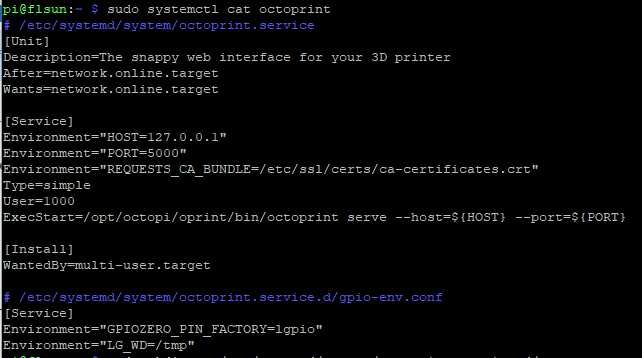
-
Step 4: Stop the service, reinstall the dependencies, start the service
sudo systemctl stop octoprint
source ~/oprint/bin/activate
pip install --upgrade lgpio
pip install --upgrade gpiozero
deactivate
sudo systemctl start octoprint
I ran the commands. But now the gpio status plugin dosnt show any pins. It says failed to retrieve
But does physical button work now? That's what we were trying to fix.
No. I made a button that homes the printer via g28. But not doing it
any errors in octoprint.log this time?
ModuleNotFoundError: No module named 'lgpio'
Ah, looks like we missed the dependency (instructions above adjusted for future reference). Try this.
source ~/oprint/bin/activate
pip install lgpio
deactivate
sudo service octoprint restart
It works now. Thanks so much.
For some reason when i change the gcode to be executed in physical button plugin it dosnt save.
And i did press the save button on octoprint
this is another one of those, we can't see what you have available, so please share octoprint.log again and we can see if there is a relevant error for the save process.
Yeah, so this one looks like the error causing the save issue.
lgpio.error: 'GPIO not allocated'
This will more than likely be something that has to get fixed in the code of the plugin. But to verify, I'd start by creating a backup in OctoPrint's settings and then in plugin manager use the eraser buttton/icon to clear the plugin's setting completely and start over. Not sure that will help, but it shouldn't hurt, you'll just have to re-configure the plugin's settings.
That was it. Again thanks so much for your time and help i really appreciate it.
1 Like
This topic was automatically closed 90 days after the last reply. New replies are no longer allowed.