I wanted to modify that txt file like you said in one of your post but in this version that octopi.txt is in different spot and doesn’t contain anything that can be changed.I couldn’t figure out how to change resolution in mjpg-streamer
The octopi.txt file has moved from /boot/octopi.txt to /boot/firmware/octopi.txt. Quoting from that file:
### Heads-up: The "input_raspi" input module of mjpg-streamer is no longer supported. ### Raspicam support is now available on the "input_uvc" module.
My configuration is RPi 3B, RPi camera V2, OctoPi 1.1.0, OctoPrint 1.11.5 and my camera is working the same as it always has but I did verify that: #camera_usb_options="-r 640x480 -f 10"
is now being used to set the resolution on the RPi cam.
I did see that post but I’m not sure how to change resolution.My understanding is I have to use command in mjpg-streamer folder but l’m newb to all this so I can’t figure out what exactly have to write to edit resolution in input_uvc.so
Remove the # from (only) one of those lines and type sudo service webcamd restart. You can check the current status with sudo service webcamd status. Some of these options might not work.
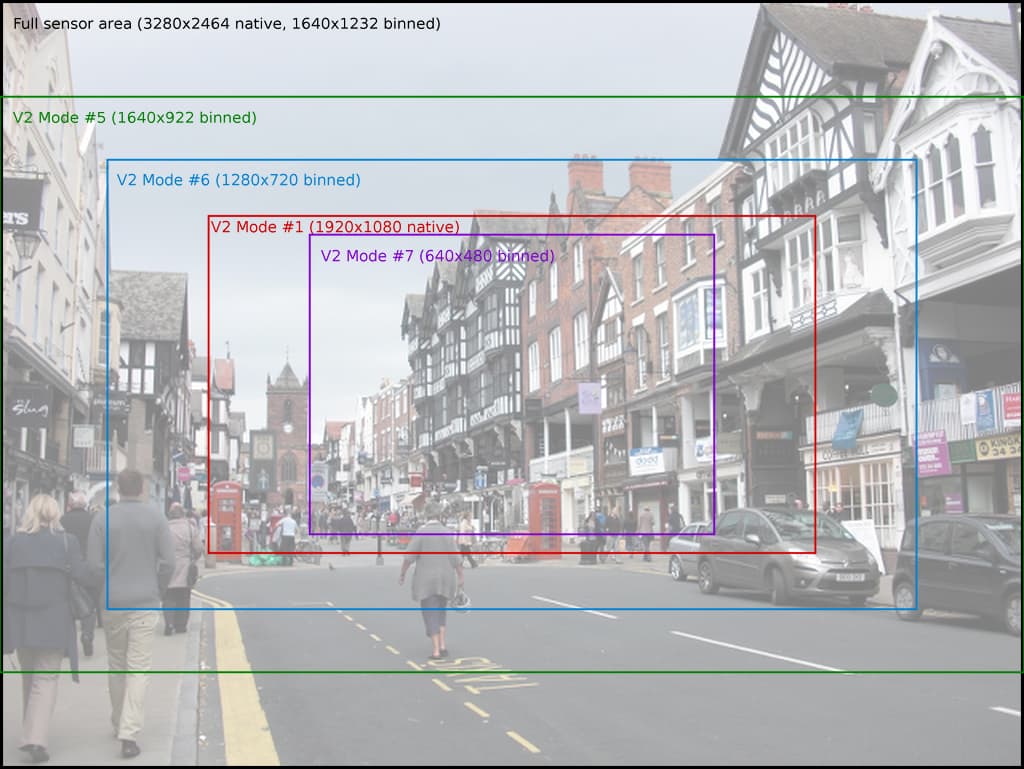
I got the data above from here. Scroll down to the V2 image (copied below) to see how the changes effect the FOV.
I tried that and whatever resolution I try using,nothing changes and when I check camera status,it always shows 640x480.My understanding is that it can’t be changed anymore through octopi.txt but like I said,I’m new to this so I’m probably wrong.Did you actually try changing yours in octopi.txt and had results?
Before posting my reply with the sample options and the image, I tested each one of the those lines on my OctoPrint system.
In an SSH terminal:
sudo nano /boot/firmware/octopi.txt
Scroll down to the #camera_usb_options line
Remove the # from the beginning of a line.
Ctrl-O, return, Ctrl-X to save the change.
sudo service webcamd restart
sudo service webcamd status
q to exit the status.
Again, here are the lines from my octopi.txt. The yes/no comment at the end of the line reflects which ones worked and which ones did not on my system.
# Defaults to a resolution of 640x480 px and a framerate of 10 fps
#
#camera_usb_options="-r 640x480 -f 10" #yes
camera_usb_options="-r 1280x720 -f 10" #yes
#camera_usb_options="-r 1408x792 -f 10" #yes
#camera_usb_options="-r 1640x922 -f 10" #yes
#camera_usb_options="-r 1640x1232 -f 10" #no
#camera_usb_options="-r 3280x2464 -f 10" #no
#camera_usb_options="-r 1920x1080 -f 10" #yes
Here is the output of the status. Note the "7966" line is very long so you will have to scroll to see the change.
pi@octopi:~ $ sudo service webcamd status
● webcamd.service - the OctoPi webcam daemon with the user specified config
     Loaded: loaded (/etc/systemd/system/webcamd.service; enabled; preset: enabled)
     Active: active (running) since Sun 2025-12-28 07:38:09 MST; 8min ago
   Main PID: 7945 (webcamd)
      Tasks: 5 (limit: 1445)
        CPU: 4.532s
     CGroup: /system.slice/webcamd.service
             ├─7945 /bin/bash /root/bin/webcamd
             └─7966 ./mjpg_streamer -o "output_http.so -w ./www-octopi -n --listen 127.0.0.1" -i "input_uvc.so -r 1280x720 -f 10 -d /dev/video0"

Dec 28 07:38:09 octopi mjpg_streamer[7966]: MJPG-streamer [7966]: Frames Per Second.: 10
Dec 28 07:38:09 octopi mjpg_streamer[7966]: MJPG-streamer [7966]: Format............: JPEG
Dec 28 07:38:09 octopi mjpg_streamer[7966]: MJPG-streamer [7966]: TV-Norm...........: DEFAULT
Dec 28 07:38:09 octopi mjpg_streamer[7966]: MJPG-streamer [7966]: www-folder-path......: ./www-octopi/
Dec 28 07:38:09 octopi mjpg_streamer[7966]: MJPG-streamer [7966]: HTTP TCP port........: 8080
Dec 28 07:38:09 octopi mjpg_streamer[7966]: MJPG-streamer [7966]: HTTP Listen Address..: 127.0.0.1
Dec 28 07:38:09 octopi mjpg_streamer[7966]: MJPG-streamer [7966]: username:password....: disabled
Dec 28 07:38:09 octopi mjpg_streamer[7966]: MJPG-streamer [7966]: commands.............: disabled
Dec 28 07:38:09 octopi mjpg_streamer[7966]: MJPG-streamer [7966]: starting input plugin input_uvc.so
Dec 28 07:38:09 octopi mjpg_streamer[7966]: MJPG-streamer [7966]: starting output plugin: output_http.so (ID: 00)
pi@octopi:~ $
Ok ,I got it to change resolution-thanks.Only thing is that if I try 1920x1080,picture is even more zoomed.1280x720,640x480 and 320x240 have pretty much same zoom with 1280x720 filling full screen (I believe in 16:9) and those other 2 have black side edges (shrunk to 4:3).Maybe it’s my camera but seems like whatever I do I can’t zoom it out.Might have to relocate camera after all.Thanks for all your help,I really appreciate it