I was gifted a raspberry pi but cant get past login. I put a new sd card in the raspberry pi and flashed the sd. when I went to start it, it booted up and I had to log in but even with the original users log in it wont let me get past that part. is there someplace I can alter that?
A heads up I am new to all of this and slowly working through all of it.
Thank you
What did you already try to solve it?
WRITE HERE
Have you tried running in safe mode?
WRITE HERE
Did running in safe mode solve the problem?
WRITE HERE
Systeminfo Bundle
You can download this in OctoPrint's System Information dialog ... no bundle, no support!)
WRITE HERE
Additional information about your setup
OctoPrint version, OctoPi version, printer, firmware, browser, operating system, ... as much data as possible
If you flashed a new microSD card, then you are in complete control of the username(s) and password(s).
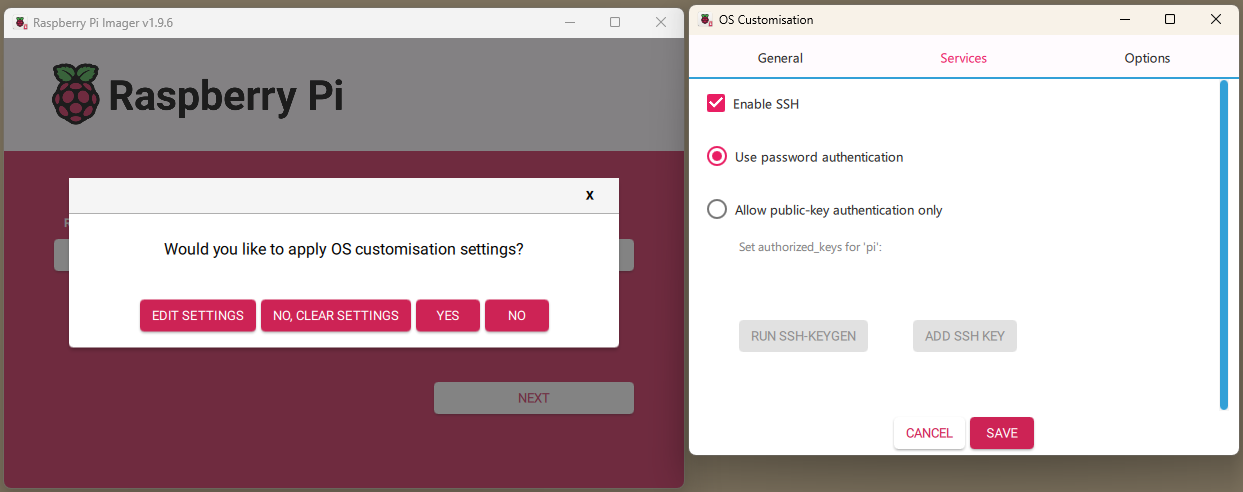
I would suggest that you use "pi" for the username but set your own password in the Raspberry Pi Imager (assuming this is what you used to flash the card). Set your WiFi credentials and be sure to enable SSH as well.
In any case, please provide details on the model of RPi and the steps you used to create the microSD card.
I have a RPi 3 and I used the Raspberry Pi imager.
when I flashed the microSD i used these settings
Raspberry Pi Device
-Raspberry Pi 3
--(Models B, A+, B+, and compute Module 3,3+
Operating system
-Other specific-purpose OS (home automation, 3D printing and specialized operating systems)
--3D printing
---OctoPi ( a Raspberry Pi Distribution for 3D printers. Ships OctoPrint out-of-the-box)
----OctoPi (new camera stack)
Storage was SD
I set up the WiFi and location.
What is the SSH you are talking about.
Thank you for the help. I look forward to figuring all this out.
SSH, Secure Shell is the preferred method for connecting to the Raspberry Pi OS. If your desktop is Windows, then PuTTY is the most often used SSH client. There is a native SSH client on Windows and there is a MacOS client but I'm not sure if it is native or something you install.
The alternative method for talking to the RPi OS is an HDMI monitor and a USB keyboard (and mouse if you wish to use a RPi desktop).
The Raspberry Pi Imager allows you to "Edit Settings". Select "Services" as shown below. Check "Enable SSH". Most people just "Use password authentication".