I'm the original poster for the GitHub thread above, looks like you're not using mqtt while connecting octoprint to HA (I highly recommend you should use mqtt - faster and more information), but if you're using the standard octoprint integration, go to your integrations add octoprint and give it the host of your 2nd instance, it should work.
I take it you mean the IP address? Or the IP address and any subdirectories, since I have two instances on one Pi.
One is at http://erebor/prusa and that's the one HA knows about. (It was the first instance I set up.) The 2nd instance is at http://erebor/e3p. So you're suggesting, if I understand it right, I add Octoprint as an integration and give it http://erebor/e3p as the address?
not sure how you got that as address. If you're using the same pi they would have same ip address with different ports for the octoprint instances, try entering ip with ports in octoprint integration? Example 192.168.1.50:8000
My LAN DNS provides names for all my devices. I can remember names, but not numbers. (Plus, as a Tolkien fan, I love typing something like "ssh pi@erebor.") I'm experimenting - using the host name, the full domain name - for this LAN, that's arda.ea - and IP address. They have port in a different field. I'm finding, in each case, it's telling me it can't retrieve the application API key. (I created a new key on that Octoprint instance for HA.)
I'd like to add MQTT, but I haven't used it in a good while and I'd have to read up on it to familiarize myself with it again. As it is, with just Octoprint, on the first instance, it seems to have everything I need for info.
I still have more combinations to try. I wish I could read the info on the other instance so I could specifically see what it used as host and port, for example.
A few notes:
-
I needed to add the plugin Home Assistant Discovery and make sure I have it set so notifications will pop up. Once I did that, I got the notice from a pop-up and responded.
-
Using just the normal Octoprint integration, after I responded in the OctoPrint pop-up, I got a notice on HA that the device was already configured. It looks like, if I want two instances on the same Pi to show up on HA, I'm going to have to go on and add MQTT and go through there.
I was about to give up for the evening and found one more thing in the docs, something I misunderstood the first time through. In /home/pi/.octoprint/config.yaml is the UUID, under upnpUuid. But most of the time when you set up the 2nd instance of OctoPrint, it goes in /home/pi/.octoprint2/config.yaml and most of the time, none of us change the UUID for the 2nd instance. So go online and find a UUID generator, generate a UUID and replace the one in that 2nd instance with the new UUID. I did this, rebooted the entire system, played a quick game of solitaire, then went back to Octoprint, made sure it was up, and went to HA. It had already discovered the 2nd instance on its own.
The one issue is that it sees the camera there, but is not getting a stream from it. That could be an issue with the ports specified in haproxy or something.
Ah okay I might look into naming my devices as well, as for mqtt there is a tutorial on YouTube how to setup octoprint mqtt on ha, the only thing he forgets to mention is that on your 2nd instance before you even setup discovery don't forget to change base topic on mqtt plugin in octoprint, I didn't do that and kept scratching my head, another point is that if you mess up anything you can go to ha mqtt integration and delete that particular device(octo instance) and start over, waiting to hear back from you 2 successful installs  after you finish that up go ahead and install threedy from hacs for some neat 3d printer cards for HA.
Do you have a webcam on both instances of OctoPrint? I did find that this is a known issue and just came up as a recent issue. From what I get out of that, the Octoprint integration in HA expects the webcam to be at port 5001. There's no way, at this point, with just the Octoprint integration, to tell it where to look in a 2nd instance for the 2nd webcam.
The mqtt integration didn't get the camera automatically, I didn't look into it because i'm mostly using it for automations only. what do you have defined here?
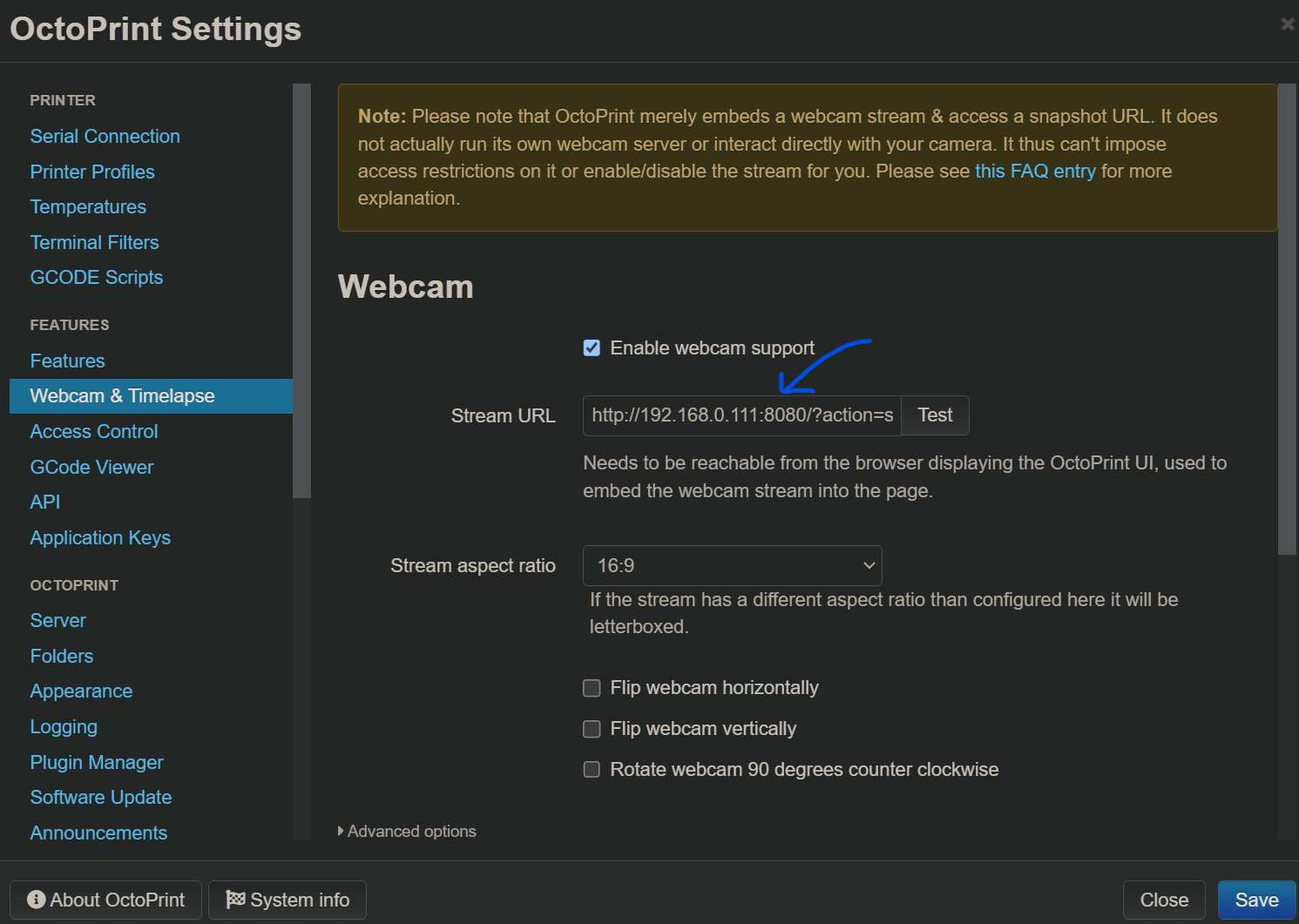
I have just:
/came3p/?action=stream
Full URL would be:
http://172.16.7.21/campe3p/?action=stream
or
http://172.16.7.21:5011/?action=stream
The default address or port would go to my instance with my Prusa or the webcam on the Prusa. I have 5000 and 5001 sent to the Prusa instance and Prusa webcam, respectively. 5010 and 5011 go to the 2nd instance, for an Ender 3 Pro. (I figured I'd make each instance off 10 more on port numbers, and add 1 to that for the webcam - I tend to try to keep things in a systematic pattern so I can keep track if I add more.)
It should be the one with the port number and it would go on the octoprint instances, first thing I'd do is open that url and see if the stream shows up before even trying to have it show up on ha
Yes, it does. Like you, that's the first thing I checked. I think the Octoprint integration just assumes the webcam is on port 5001. Take a look at this issue and see if that seems to be what they're saying.
PrusaSlicer and 2 printers:
I have 2 printers on my OctoPi setup and have been using PrusaSlicer and sending my gcode files directly from the slicer to the printer, through OctoPrint, with no problem at all. I've now finally reached the point of wanting to do the same with my other printer, an Ender 3 Pro. I've gone to the 2nd instance on the Pi, the one that controls the Ender, and tried to setup the connection from PrusaSlicer to OctoPrint. I created an API key just for this purpose and pasted it into the field in PrusaSlicer, but PS cannot connect to OctoPrint. I get this error:
Could not connect to OctoPrint: HTTP 403: {
"error": "Invalid API key"
}
Note: OctoPrint version at least 1.1.0 is required.
(I'm using OctoPrint 1.9.x.)
When I try it using the API key for the 1st instance of OctoPrint on the Pi, the one that controls a Prusa, I get a connection. I don't want to test it because I suspect it's connecting with the 1st instance of OctoPrint and not the 2nd one, which is the one matching this printer.
To make an API connection to the 2nd instance, do I need to add the port or the rest of the URL I use in Chrome to reach the 2nd instance? I can think of multiple possibilities of what I might need to do to connect to the API of that 2nd instance and don't want to just be taking shots in the dark.
So what do I use to get the 2nd instance API? A port, an extended URL? Something else?
Depends on how you added the second instance. In general if you put the same URL you use to connect to OctoPrint's interface in that setting for each instance individually as their own printer profile in PrusaSlicer that will allow you to have separate application keys per instance, etc.
I set up my printers to work with different URLs, like 192.168.1.12/prusa and 192.168.1.12/e3p. I also remember going through and using haproxy to assign those URLs to ports. Since 192.168.1.12 works for the Prusa (the default one), I tried 192.168.1.12/e3p for the Ender and it worked. (I'll probably update the URL for the Prusa to add /prusa - that way if I add a 3rd printer, and it's a Prusa, I'll be ready for it.)
Thank you!
1 Like
Don't forget to mark the solution.
There is no Solution box in the FAQ sub-sub-section
Just got back here. I tested it and it worked - but today, when I finally have time to print, I find that when I try to upload a file from PrusaSlicer to that 2nd instance of OctoPi, I get an error every time. It starts uploading, then I get an Error 400:
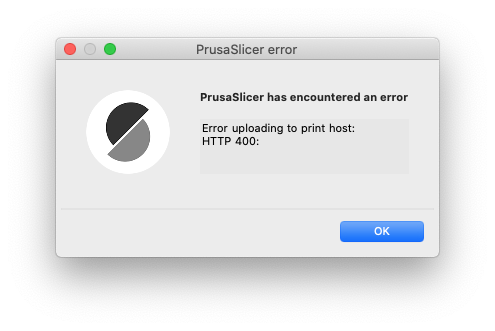
Have you checked PrusaSlicer for the correct connection settings?
Do you mean the settings here?
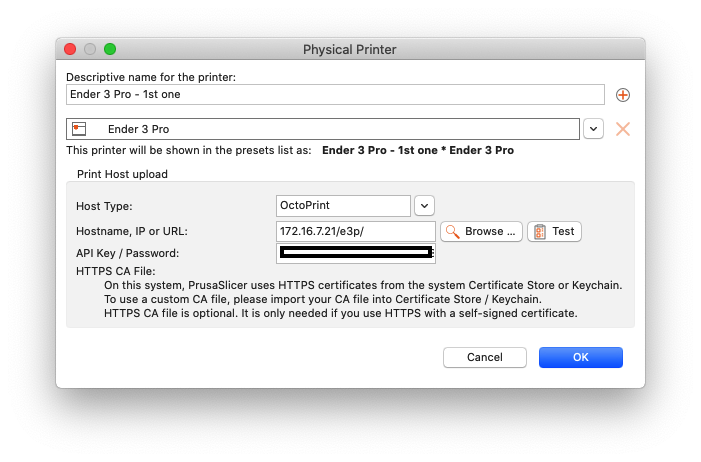
(API Key blocked out)
(That's the only connection settings I can find - hope I'm wrong and there's something elsewhere I can easily fix!)
Yes, and they test out just fine when I click test. When uploading, I get a progress indicator that makes me think they're communicating enough for most of the data to be uploaded:

So I'm wondering if there's a problem with the final part of the process.
I have no problem uploading to the first instance of OctoPi on this system (which goes to a Prusa - so the two printers are completely different brands, if that makes a difference).
I have an answer to this. It's simple, but a big confusing.
In PrusaSlicer, there's a gear icon to use to add a physical printer:
Note the gear icon control, pointed to by the red arrow:
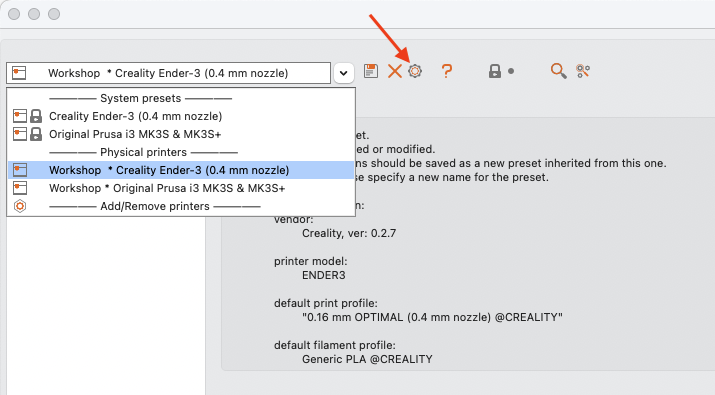
If you hover over the button with a physical printer selected, the tool tip says, "Edit physical printer" like this:

BUT - if you select a system preset and over over it, you get this:

And there it says, "Add physical printer."
It has a double function. If you click it while an existing physical printer is selected, you can edit that printer. But if you click it while a system preset is selected, then you and add a physical printer.
So if you want to add more than one physical printer, that control will only let you add one while a system preset (and not a physical printer) is selected.
1 Like
Fix one issue, another appears.
I have OctoPrint 1.9.3, just recently updated. My printer (Prusa i3 MK3S+) had not been working for a while due to a bug in the firmware. This is on a Pi 4 with 2 GB of memory. I have two instances of Octoprint, one for each printer (the other is an Ender 3 Pro). I ran a print job on my Prusa (through OctoPrint) and it didn't finish - serial communication error. I cleaned up my printer and rebooted it. Communications were okay. I also have two webcams, one for each printer. Once I had them working, I've never had an issue with the webcams.
Then, through OctoPrint, I started a print job on the Prusa and on my Ender. (First time I've ever tried to run both printers at once, from the same Pi.) Once I saw them both running, I went back to my computer and both instances of OctoPrint had notifications saying, "Could not take snapshots." I had to stop one job anyway, but let the other run. The webcam never came back, even after the print job ended and the Pi was just sitting idle.
I restarted the Pi using the OctoPrint controls. When it rebooted, both webcams came up again. I started a new job on the Prusa and the webcam stream was still active. An hour or so later I checked and it was there. Another hour later and there is no webstream and the same notification about snapshots is there again. The webcam for the printer I'm not using is active.
Is a Pi 4 with 2 GB enough to handle 2 printers and 2 webcam streams? If not, what would I need to handle that? Would more memory fix the issue or do I need to change my setup to use 2 Pis? I also have a server with 4 2Ghz Intel Core i3-5005U and 8GB of memory. Would that handle 2 printers and 2 webcams? (And, since it's multi-core and notably more memory than my Pi4, could it handle more printers and webcams?)
Or is the issue likely something else? (I'd really rather not deal with setting up another multi-instance OctoPrint computer unless I know capacity is the issue and that the new one would be able to handle my setup and maybe even handle expansion.)