I have no Web UI after installing the 64bit Pi OS via imager, twice. On a Pi4b with monitor and keyboard/mouse connectivity.
What did you already try to solve it?
Router shows both IP's for wired and WIFI, each work independently from each other and Ive disabled them each with no results. Ran sudo service ocotprint and haproxy on the pi4 comes back as "could not be found" What I haven't noticed is the install never asking me anything about SSH login info. ?
Pinged IP's within windows, both reply
Turned on network to private not public.
Have you tried running in safe mode?
no, only bc I have no idea how to
Did running in safe mode solve the problem?
no
Systeminfo Bundle
You can download this in OctoPrint's System Information dialog... no bundle, no support, unless the reason you couldn't retrieve the bundle is your network issues
I cant retrieve this due to my login issue, I have the bundle from the working system from before if that helps idk.
octoprint-systeminfo-20251215050004.zip (49.5 KB)
this bundle zip is for the previous working version ( v 1.11.5) Python 3.9.2
Additional information about your setup
Hardware you are trying to connect to, hardware you are trying to connect from, router, access point, used operating systems, ... as much data as possible
ASUS router RT-AX88U
Firefox
Micro. Edge
Pi4 b
Im not sure Im using the correct imager tbh, should I use 64,32 or something else? Ive only tried 64 bit 2or 3x
It isn't clear to me what image (and imager) you used. Version numbers would be useful as well.
Assuming you used the Raspberry Pi Imager v2.0.0 and selected Raspberry Pi 4 as your device, the OS selection should be "Other specific-purpose OS", "3D printing", "OctoPi", and one of these two choices:
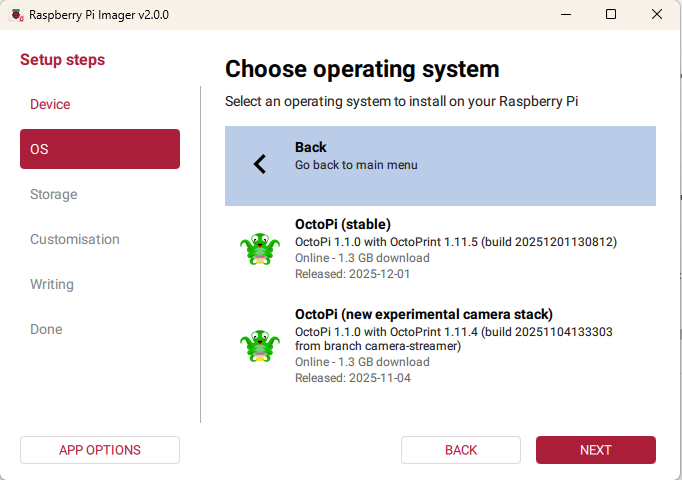
When you get to the "Customization" options, I recommend leaving the username as "pi", pick your own password (this one is for the OS), and make sure to enable SSH.
When you boot the RPi with this image installed, it takes a few minutes and it will reboot a couple of times as it configures itself. Once it settles down, you should be able to connect with a browser and do the first time OctoPrint setup. During this setup, you will be asked to create a username and password which are specific to OctoPrint and its web interface. They can be different than the OS username and password you set in the imager. If you saved a backup from your previous image, then you can use it here (as long as you remember the OctoPrint username and password).
I believe this should resolve your issue but let us know. Once we know exactly what image you used, we can provide more specific instructions.
Sorry for leaving info out thats important, yes I used the v2.0.0 imager. I will install the OS you are pointing out and im pretty sure it will fix my issue. I will report back the results. I was installing the wrong OS most likely.
Thanks
Ran the correct image, works flawlessly. Thanks again... I really need to just read things thoroughly. Thank you for your help.
2 Likes