Printer only heats up but won't start printing

What is the problem?

When I click Load and Print at a gcode file, the State changes to Printing. Then the bed is heating up and when on temp, the nozzle also starts to heat up. When the temp is reached then nothing happens...
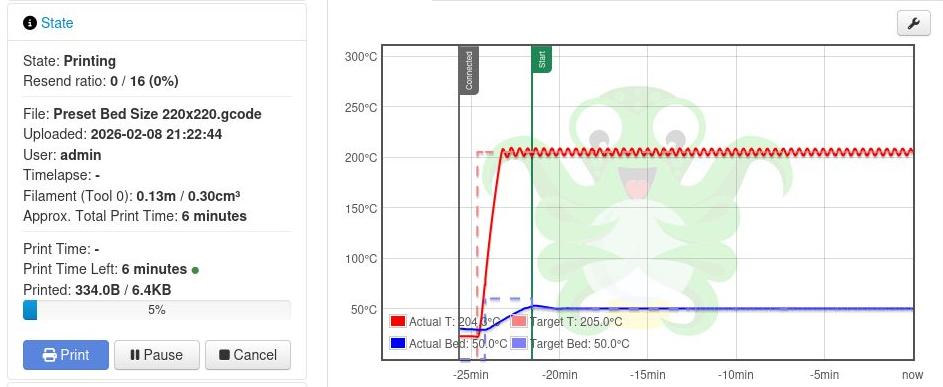
I recently added a CR-Touch to my printer and upgraded the firmware. Now this problem is back again.

What did you already try to solve it?

I tried to set the PID with M303, M301, M303, M304 and M500. Disabled most plugins. Searched the internet for the same problem.

Have you tried running in safe mode?

Yes, but I have to use the Creality Temperature Fix plugins. So without these I got all kinds of errors.

Did running in safe mode solve the problem?

In Normal mode I disabled all 30 plugins except 3: The 2 Creality temperature fixes and the logging plugin. The problem still exists.

Systeminfo Bundle

You can download this in OctoPrint's System Information dialog ... no bundle, no support!)

octoprint-systeminfo-20260209215343.zip (78.0 KB)

Additional information about your setup

OctoPrint version, OctoPi version, printer, firmware, browser, operating system, ... as much data as possible

OctoPrint Version 1.11.6, duno OctoPi version, RaspPi 3, Creality CR-10 with 4.2.7 silent motherboard and CR Touch, lubuntu OS with Firefox and BitWarden plugin. Bitwarden shows a message that it is slowing down Firefox when opening the Octoprint site. Disabling the plugin did not improve.

Firmware from here:

And on top of that the CR Touch firmware from here

Log files:
tornado.log (205.9 KB)
serial(1).log (56.4 KB)
octoprint(1).log (154.9 KB)

Hello @Al_van_Z !

Does the M303 not work at all (error message)?
Have you done the autotune as described here: PID Tuning - RepRap ?


BTW: These files are all in the systeminfo bundle

Yes, that is the autotune I did. Found it on a different website, but the steps were the same. First I got an error No Eeprom, but then I realized I had to put the sd card back in. I had the sd card removed, because I tried this as a solution I read somewhere else. When I put the sd card back in, I got OK back after entering the PID values I copied from the M303 command.
Everytime the print 'hangs', I decouple the usb cable and reboot both OctoPrint and the CR-10. So running the printer once without the SD card couldn't be the problem, I think.

Maybe here is a CR-10 config that fits to your needs.:

Do you mean the PID values from the configuration.h? I do not know how to compare the rest of the values, since my firmware is completely binary.
I compared the PID values.
These were the previous values from yesterday (with M503):
Nozzle P I D Bed P I D
M301 28,72 2,62 78,81 M304 146,80 16,80 855,04
I did another PID tuning just now. Now I got these values:
M301 18,97 1,24 72,62 M304 209,25 22,90 1274,66
And in the configuration.h from Configurations/config/examples/Creality/CR-10/CrealityV1/Configuration.h at 0f1288e5d270bc19d964515860300b3e260ed022 Β· MarlinFirmware/Configurations Β· GitHub :
M301 22,57 1,72 73,96 M304 426,68 78,92 576,71

I see a lot of differences between these 3 values. Are these values normal? And do they always fluctuate so much?

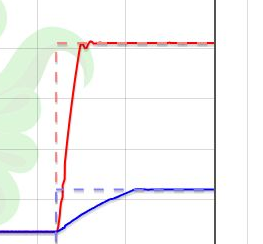
With the new PID values I see a difference in the nozzle temp chart. Where I always used to see a rimple in the temperature, with todays PID values I get a second order damping in the chart. After three rimples it ends up in a flat line. Something I have never seen before. Is that better?

No, I meant the complete Marlin configuration as a new setup.
The community setups in most cases are better than those from Creality.

Some guides: https://www.youtube.com/watch?v=Ib188-ACa08, https://www.youtube.com/watch?v=-rOZpOiWYxM

Most important is how the hotend behaves. Those values depend very much on the hotend setup you use.

BTW: Do you use a silicone-sock for the hotend?

Almost ideal. :+1:

No, didn't know it existed. I still have so much to learn.

1 Like

I still want to show a printscreen of the difference in temperature charts with the first picture. So others can also learn from this. The red line clearly shows a continues rimple in the first picture and in this picture you see only two rimples. After 30 second I now get a constant line. The bed (blue line) is also heating up faster.

image

All because I did the steps in the link of the first post of Ewald:

1 Like