Bed Level Visualizer

no working with this code , it did'nt collect data even if I have date in terminalthisd is what I get

Printer seems to support the busy protocol, will adjust timeouts and set busy interval accordingly
[...]

Printer seems to support the busy protocol, will adjust timeouts and set busy interval accordingly

Recv: busy:processing
[...]
Recv: X:114.00 Y:294.00 Z:13.700 E:0.0000
Recv: ok
Send: M113 S2
Recv: G29 Auto Bed Leveling
[...]
Recv: busy:processing
[...]
Recv: busy:processing
[...]
Recv: busy:processing
[...]
Recv: busy:processing
[...]
Recv: busy:processing
[...]
Recv: busy:processing
Recv: Z-probe:0.074 X:60.000 Y:20.000
[...]
Recv: busy:processing
[...]
Recv: busy:processing
[...]
Recv: busy:processing
Recv: Z-probe:-0.067 X:130.000 Y:20.000
[...]
Recv: busy:processing
[...]
Recv: busy:processing
[...]
Recv: busy:processing
Recv: Z-probe:-0.384 X:200.000 Y:20.000
[...]
Recv: busy:processing
[...]
Recv: busy:processing
[...]
Recv: busy:processing
Recv: Z-probe:-0.180 X:200.000 Y:135.000
[...]
Recv: busy:processing
[...]
Recv: busy:processing
[...]
Recv: Z-probe:-0.040 X:130.000 Y:135.000
Recv: busy:processing
[...]
Recv: busy:processing
[...]
Recv: busy:processing
[...]
Recv: Z-probe:-0.050 X:60.000 Y:135.000
Recv: busy:processing
[...]
Recv: busy:processing
[...]
Recv: busy:processing
[...]
Recv: Z-probe:-0.163 X:60.000 Y:250.000
[...]
Recv: busy:processing
[...]
Recv: busy:processing
[...]
Recv: busy:processing
[...]
Recv: Z-probe:0.023 X:130.000 Y:250.000
[...]
Recv: busy:processing
[...]
Recv: busy:processing
[...]
Recv: busy:processing
Recv: Z-probe:0.110 X:200.000 Y:250.000
[...]
Recv: busy:processing
Recv: echo:Bilinear Leveling Grid:
Recv: echo: 0 1 2
Recv: echo: 0 +0.074 -0.067 -0.384
Recv: echo: 1 -0.050 -0.040 -0.180
Recv: echo: 2 -0.163 +0.023 +0.110
Recv:
Recv: X:200.00 Y:289.00 Z:13.590 E:0.0000
Recv: ok
Recv: ok

Any idea?
Firmware is Marlinkimbra a derivate from Marlin

I tried
G28
@BEDLEVELVISUALIZER
G29 V4

and

M155 S30
@BEDLEVELVISUALIZER
G29 T
M155 S3

same results

I just released an updated version that may work for you. It's version 0.1.8 and adds the newer marlin bilinear and catmull rom expansion. I didn't write the code for this update, but based on what you have shown there it might work for you after enabling the Bilinear option in settings after updating.

is the geeetech a30 also working? or do you need some time for it? :blush: Can't wait for it :grimacing:

I just had to revert an update that has taken some time away from getting the a30 working for you. Sorry, I do this after hours during free time, sorry I haven't gotten to fix it for you yet.

Okok thx just asked :blush:

If I just want to view the last previously done leveling is it correct to just have M420 V in the GCODE commands text box?

Secondly, if I run a G29 automatically before each print, is that automatically saved to EEPROM or just used for that print and lost with powering off the printer?

(Anycubic Mega S / Marlin / Bltouch)

All of these questions are very firmware specific. For me on Marlin 1.1.9 with Unified Bed Leveling I can run the command G29 T and it will report the results of the mesh currently loaded, either from EEPROM after a fresh boot or from after running a leveling process and loaded into memory but not stored.

Thanks!

I'll check what G29 T does on mine.

Specifically, What codes ended up working for you, please?

Hi, I have an anycubic Chiron.

Used the g29 t code which seems to work fine and returns these codes
Recv: 0 -3.83 -3.98 -3.99 -4.11 -4.24
Recv: 1 -3.92 -3.99 -3.95 -4.03 -4.10
Recv: 2 -4.00 -3.99 -3.93 -3.96 -3.99
Recv: 3 -4.08 -4.03 -3.97 -3.98 -3.95
Recv: 4 -4.14 -4.10 -4.01 -4.01 -3.95

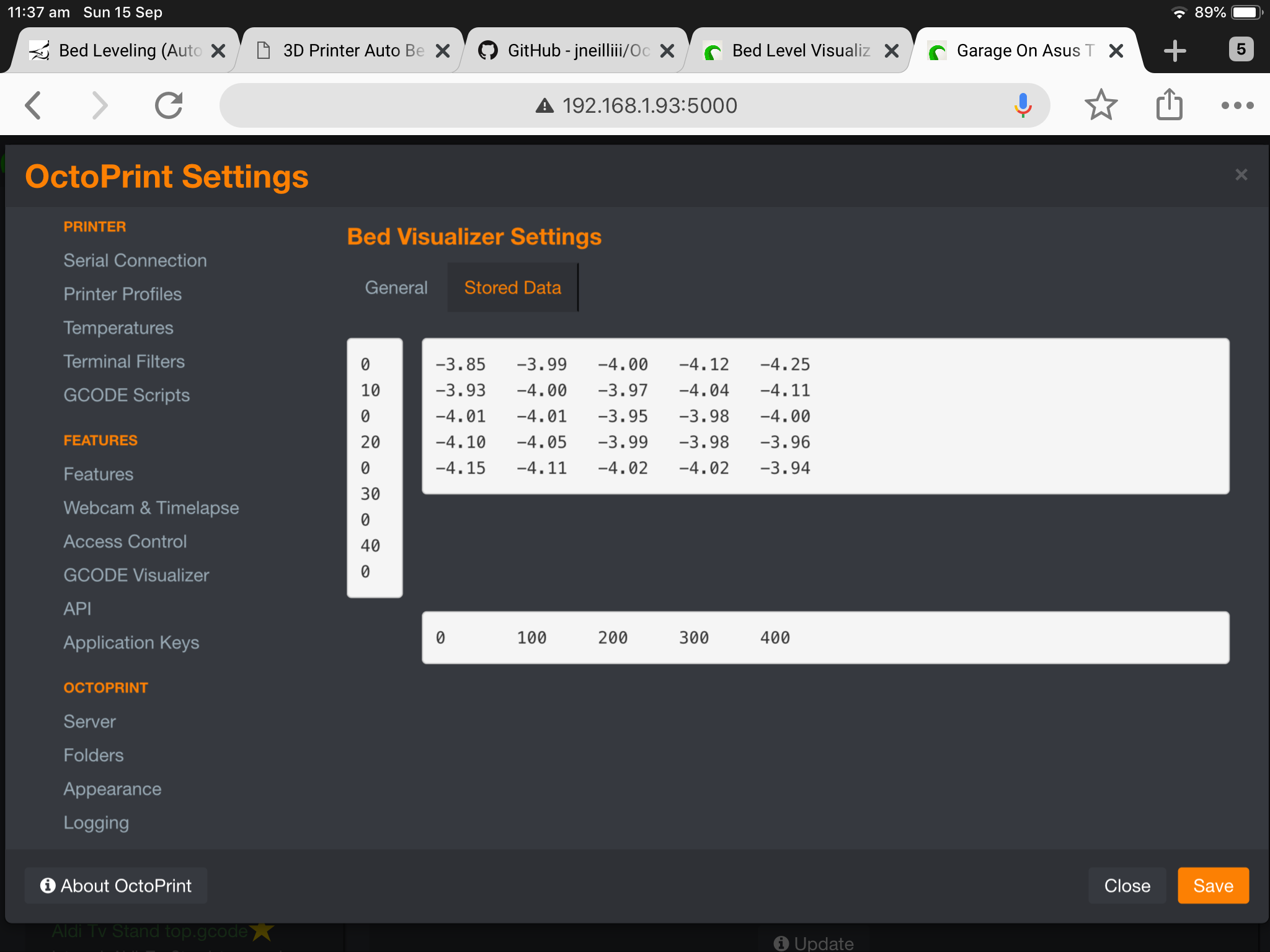
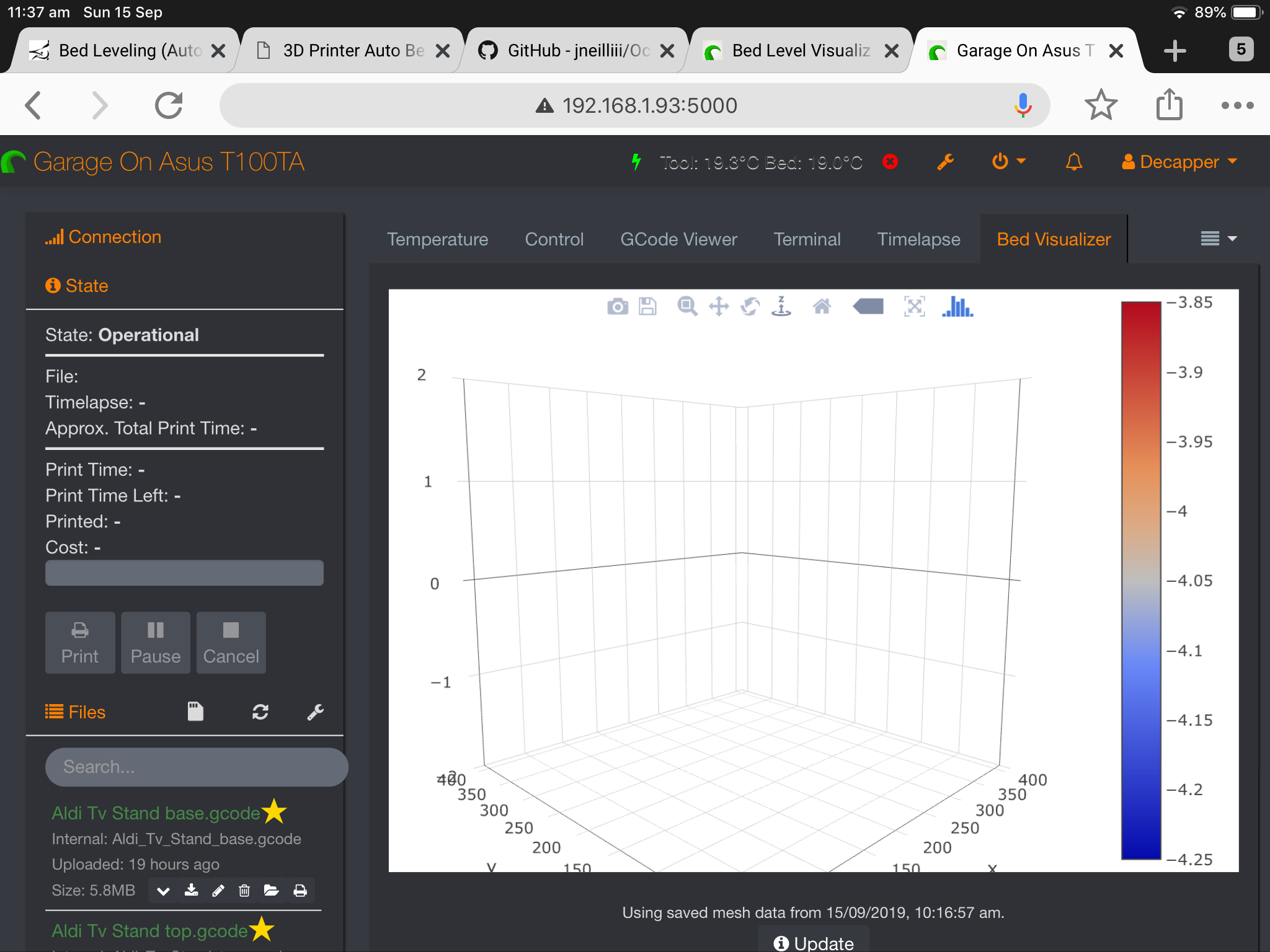
It’s also saved in the stored levels of your plugin. But the graph is empty. I take it that code is wrong?

Could be a browser/openGL related issue.

@jneilliii thx for the response, I’ve tried safari, chrome and edge with no success. I’ll attach screenshots

I see something isn't getting interpreted correctly. The stored mesh data has multiple 0 rows and it's causing something to get off in the graphing. Please type the command G29 T again and post the complete response from beginning to ending ok in the terminal, preferably as a txt file attachment.

Thanks @jneilliii for all your help

Edit. I just noticed that taking the photo above on my iPad moves the zero down from the line above. On a normal browser the rows are
0, 100, 200, 300, 400

G29T.zip (340 Bytes)

That makes sense. Try enabling the Use Relative Z Offsets option, restart OctoPrint and try again.

That did the trick thank you.. I did think it was that, but I didn't think about the restart and update again.

Hi.
firs of all i wanted to thank you for your hard word,

second i would like to add that

yesterday i installed bltouch on cr10 mini with the latest th3d unified firmware and i'm still running a nightly build of octopi 0.17 on a pi4 and i kept getting this same error

the only thing i could find in the log was that there was an ! before the plugin in the list of loaded pluging, i power cycled the machine couple times but nothing changed.

today the error is gone, guess all good now

Continuing the discussion from Bed Level Visualizer:

Hey @all,

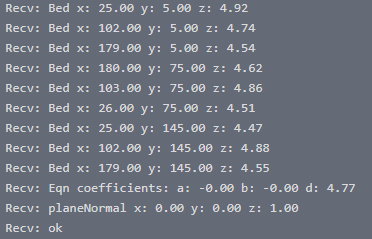
I have installed the PlugIn and when i start the codes G28 and G29T i get atached matrix: image
Shouldnt it work with this kind of data? I only get the mesh timeout error.

Thanks.

Yes, I believe that format is accounted for. Increase the timeout in settings to give it enough time to complete the probing procedure, which is what I am assuming is happening to you.