What is the problem?
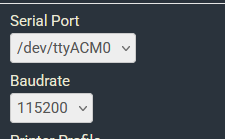
I can't get octoprint to connect with my printer and the dmesg output does not show the needed code in this help article - OctoPrint can't connect to my printer
What did you already try to solve it?
I followed all steps in OctoPrint can't connect to my printer and it said to set up a Get Help ticket if it did not work.
Have you tried running in safe mode?
Yes, that did not fix the issue
Did running in safe mode solve the problem?
no
Systeminfo Bundle
browser.user_agent: Mozilla/5.0 (Macintosh; Intel Mac OS X 10_15_7) AppleWebKit/537.36 (KHTML, like Gecko) Chrome/144.0.0.0 Safari/537.36
connectivity.connection_check: 1.1.1.1:53
connectivity.connection_ok: True
connectivity.enabled: True
connectivity.online: True
connectivity.resolution_check: octoprint.org
connectivity.resolution_ok: True
env.hardware.cores: 4
env.hardware.freq: 1000.0
env.hardware.ram: 379863040
env.os.bits: 32
env.os.id: linux
env.os.platform: Linux-6.6.51+rpt-rpi-v7-armv7l-with-glibc2.36
env.plugins.pi_support.model: Raspberry Pi Zero 2 W Rev 1.0
env.plugins.pi_support.octopi_camera_stack: webcamd
env.plugins.pi_support.octopi_version: 1.1.0
env.plugins.pi_support.octopiuptodate_build: 1.1.0-1.11.6-20260127133909
env.plugins.pi_support.octopiuptodate_build_short: 2026.01.27.133909
env.plugins.pi_support.throttle_check_enabled: True
env.plugins.pi_support.throttle_check_functional: True
env.plugins.pi_support.throttle_state: 0x0
env.python.pip: 25.0.1
env.python.version: 3.11.2
env.python.virtualenv: True
octoprint.last_safe_mode.date: 2026-01-30T18:07:57Z
octoprint.last_safe_mode.reason: settings
octoprint.safe_mode: True
octoprint.version: 1.11.6
systeminfo.generated: 2026-01-30T18:13:16Z
systeminfo.generator: zipapi
WRITE HERE
Additional information about your setup
My printer is a Prusa i3 MK3S and I am using a Raspberry Pi Zero 2
WRITE HERE