Physical button plugin

You really should not be editing around directly in the service files if you can avoid it, instead use overrides (built-in systemd feature). That's also what systemctl edit does.

Commands that should in practice achieve the same (I cannot test this myself, so someone else needs to):

sudo mkdir -p /etc/systemd/system/octoprint.service.d/
echo -e '[Service]\nEnvironment="LG_WD=/tmp"' | sudo tee /etc/systemd/system/octoprint.service.d/gpio-env.conf
sudo systemctl daemon-reload

You can confirm the active service information is with systemctl cat octoprint.

Then restart OctoPrint.

If that's the case, should the already merged change to the service file in OctoPi be updated for this same approach?

Shipping it from the get-go like this should be fine, but I'd avoid changing shipped files if there's another option in general. So, the already merged PR should stay like it is, but end users who want to change things should use the official approach to adjusting systemd unit files IMHO.

So i need to update? Is that what you are saying?

That won't even help as the service file change was not made prior to the release of the latest OctoPi version 1.1.0.

Run the commands I listed above.

First of all, sorry for the late response i was very busy.

I ran the commands, but still not working. I also tryed gpio status plugin and that also didn't work

You could try the SIO Control plugin along with a cheap micro controller and get what you want. These complications are a part of the reason I made it. Imagine your sd card fails in 3 months(the reason I don't use an Rpi), will you remember what it was that you did to get things working? It may not be part of that backup you likely did not make. :slight_smile:

This seems to be very similar to psu control. I want a physical button connected to my raspberry pi that can perform a specific gcode. As far as i know psu control only performs outputs.

Well that helps me understand that I must not have made the point on what it does in the description.

Outside the idea that you are focused on connecting something to the Pi... The SIO Control Plugin and controller does handle both inputs and outputs. One of the items in the screenshot(FRS) is configured as an input. What you see on the interface is the status of that input, its actually a filament runout limit in that case but buttons work exactly the same.

Not trying to sell you, it for sure is not for everyone. Just pointing out options to solve your challenge.

I see. And then i can use sio reaction to send gcode. I will look into it. Thanks for the recomendation

1 Like

Please share a system info bundle so we can evaluate for any errors.

octoprint-systeminfo-20251004062703.zip (88.4 KB)

perfect...underlying error...

2025-10-03 06:36:43,119 - octoprint.plugin - ERROR - Error while calling plugin physicalbutton
Traceback (most recent call last):
  File "/opt/octopi/oprint/lib/python3.11/site-packages/octoprint/plugin/__init__.py", line 285, in call_plugin
    result = getattr(plugin, method)(*args, **kwargs)
             ^^^^^^^^^^^^^^^^^^^^^^^^^^^^^^^^^^^^^^^^
  File "/opt/octopi/oprint/lib/python3.11/site-packages/octoprint/util/__init__.py", line 1692, in wrapper
    return f(*args, **kwargs)
           ^^^^^^^^^^^^^^^^^^
  File "/opt/octopi/oprint/lib/python3.11/site-packages/octoprint_physicalbutton/__init__.py", line 25, in on_after_startup
    setup_buttons()
  File "/opt/octopi/oprint/lib/python3.11/site-packages/octoprint_physicalbutton/lib/gpio_setup.py", line 18, in setup_buttons
    new_button = Button(button_gpio, pull_up=True, bounce_time=None)
                 ^^^^^^^^^^^^^^^^^^^^^^^^^^^^^^^^^^^^^^^^^^^^^^^^^^^
  File "/opt/octopi/oprint/lib/python3.11/site-packages/gpiozero/devices.py", line 108, in __call__
    self = super(GPIOMeta, cls).__call__(*args, **kwargs)
           ^^^^^^^^^^^^^^^^^^^^^^^^^^^^^^^^^^^^^^^^^^^^^^
  File "/opt/octopi/oprint/lib/python3.11/site-packages/gpiozero/input_devices.py", line 414, in __init__
    super(Button, self).__init__(
  File "/opt/octopi/oprint/lib/python3.11/site-packages/gpiozero/mixins.py", line 433, in __init__
    super(HoldMixin, self).__init__(*args, **kwargs)
  File "/opt/octopi/oprint/lib/python3.11/site-packages/gpiozero/input_devices.py", line 171, in __init__
    self.pin.when_changed = self._pin_changed
    ^^^^^^^^^^^^^^^^^^^^^
  File "/opt/octopi/oprint/lib/python3.11/site-packages/gpiozero/pins/__init__.py", line 432, in <lambda>
    lambda self, value: self._set_when_changed(value),
                        ^^^^^^^^^^^^^^^^^^^^^^^^^^^^^
  File "/opt/octopi/oprint/lib/python3.11/site-packages/gpiozero/pins/pi.py", line 319, in _set_when_changed
    self._enable_event_detect()
  File "/opt/octopi/oprint/lib/python3.11/site-packages/gpiozero/pins/rpigpio.py", line 226, in _enable_event_detect
    GPIO.add_event_detect(
RuntimeError: Failed to add edge detection

searching that error on the issue tracker led to this post, which points to possible solution here, which seems to indicate you need more than just one Environment variable in the service config.

Environment="GPIOZERO_PIN_FACTORY=lgpio"
Environment="LG_WD=/tmp"

which was also mentioned in this post.

so in theory...

  • Step 1: SSH to pi

  • Step 2: Run these commands to add the service overrides

    sudo mkdir -p /etc/systemd/system/octoprint.service.d/
    echo -e '[Service]\nEnvironment="GPIOZERO_PIN_FACTORY=lgpio"\nEnvironment="LG_WD=/tmp"' | sudo tee /etc/systemd/system/octoprint.service.d/gpio-env.conf
    sudo systemctl daemon-reload
    
  • Step 3: Validate the override

    sudo systemctl cat octoprint
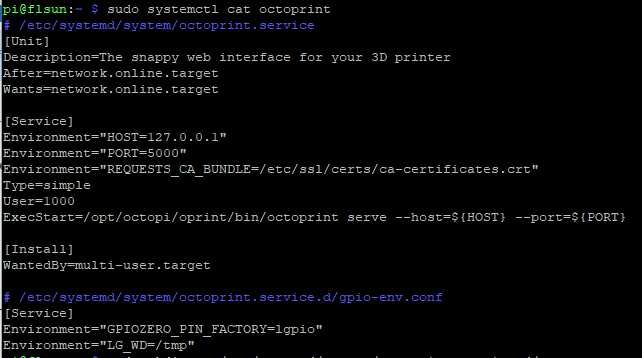
    

    image

  • Step 4: Stop the service, reinstall the dependencies, start the service

    sudo systemctl stop octoprint
    source ~/oprint/bin/activate
    pip install --upgrade lgpio
    pip install --upgrade gpiozero
    deactivate
    sudo systemctl start octoprint
    

I ran the commands. But now the gpio status plugin dosnt show any pins. It says failed to retrieve

But does physical button work now? That's what we were trying to fix.

No. I made a button that homes the printer via g28. But not doing it


do i need to change anything here?

any errors in octoprint.log this time?

yeah
octoprint (1).log (52.1 KB)