I'm fairly certain it does however the pi for my printer is dedicated and only has the printer connected to USB so this process works for me.
On a related project I need to write a UDEV rule to automount a usb drive and decrypt a volume with the key on the the drive. First attempt didn't work as hoped so I'll probably be reading up on USB bus stuff and may be able to refine this procedure.
Everybody using a Pi pretty much has this problem, get one of these, https://www.tindie.com/products/brianlough/power-blough-r/
Problem solved - Brian made this device specifically to disconnect the +5 feed from the Pi's USB port. It works I have a couple of these, but need some more.. one for each Octoprint printer. I do not like cutting cables, this is perfect.
Yep, dumbed down, but they work, I've just ordered a stack of USB breakout boards from Aliexpress to make the next batch. Might even make a 3D printed case for them
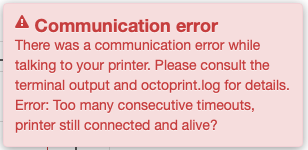
I was having occasional undervotage and other gremlins on my printer, so I was looking for a way to isolate 5V and saw the tape-pin method suggested. Unfortunately, my board would no longer communicate (2560 / Ramps 1.4). Looking at the schematic for the 2560, it uses an ATMEGA8U2 as a USB to UART converter, and on that chip, if the USBVcc is unpowered, it won't power the USB side of the converter. If you don't have 5V on your cable, no USB communications will happen. So give it 5V! But, from your printer's control board, not your Pi . Most boards should have a ton of 5V pins on aux I/O.
Just made a cable to do this on my printer and it is working great. Time will tell if it solves my undervoltage and other gremlins.
One of the designs—on paper—which I created was something like...
Pi-side relay, if on, allows the Arduino to see its own 5V on that Arduino-side 5V serial pin
Arduino-side relay, if on, allows the Pi-side relay to have power
So basically, if either side is off then there is no communication. But if both sides are on, the 2nd relay powers the first which then allows the Arduino to see its own 5V. The Pi never sinks power but neither side are fooled into thinking the other is up when it's not.
I think it's not so a good idea to let an IC receiving signals without it's 5V-supply. Although generally all IC-inputs have protector-diodes inside, where the missing (5V-)voltage could surge, it may under circumstances destruct the signal-receiving IC.
I solved this 5V-isolating-problem with a (magnetic) USB-to-USB-Isolator (including the ADUM4160-IC): - available on Amazon, ebay, AliExpress, etc...
I desoldered the (5V-)transformer to split the Power-Lines, so each side is powered from it's own 5V-line.
So if one of the two devices (3D-Printer or RasPi) are OFF, neither signal nor 5V can pass through - all 4 wires are automatically OFF and Printer <=> RasPi communicates only if both devices are "on" - but they are electrically independent from each other.
Sadly it doesnt work on my Prusa Mk3S. I needed to do something as I have had periodic reboots of my printer since I started using a 5v buck converter to power the Pi from the 24v psu and a USB cable to connect the data. If I disconnect the USB it works ok (apart from no communication!)
I dont want to go back to powering the Pi from the Einsy board 5v supply but I may change the data transfer back to the trusty ribbon cable I used before.
@PrintedWeezl
Could that be, if you don't tape the 5V pin, that months of usage like that will eventually kill the serial port on the printer's motherboard?
I have an Ender 3 (not pro) with an mks gen l version 1.0 and through an usb it has been working for months, until yesterday. The serial port on the mks is dead, I know that because I have another one and OctoPrint detects that one.
It wouldn't be nice it that's the case and I go through the hassle of customizing Marlin all over again (I lost my backup of it) and then this will just happen again after a few months.
The Pi is directly powered with a buck converter connected to the PSU so it power up at the same time as the printer but the printer reboots after a few seconds because, I think, OctoPrint takes longer to power up an make the mks reboot when it does.
@8FootedAlgaeEater
How has this been working for you so far? Any problems?
I'm almost an electrician so I could very well do this. Bypassing the serial port of the mks could save me a lot of time having to do all the programming again with a new board. But if this method comes with some troubles, then maybe it's not worth it.
This is expected behaviour on many consumer/hobby 3D printers. What is probably happening is it takes time for the Pi's OS to spool up and then launch the OctoPrint process. You must have OctoPrint configured to automatically connect, it is this connecting (opening the serial port) that causes the printer to reboot.
The reason for this is when the printer boots it waits for signalling from a firmware update program (avrdude for the 8-bit AVR chips). If it doesn't see that signalling within a second or two it will then run the last loaded firmware. This is how the Arduino ecosystem does firmware updates, and most of our consumer 3D printers (particularly the rep-rap based printers) are specialized Arduino appliances.
It hasn't been said here but turning of the power to the RPi without a proper shutdown has a non-zero probability of corrupting the RPi SD card. The RPi doesn't consume much power and having it on even when the printer is off can be very useful.
Initially I saw this and it seems to make sense. Then I realize that ADUM4160 also need power supply on the downstream side (printer) but you are not suppose to use the downstream 5V, and Ender 3 indeed does not supply 5V to micro-USB side which makes sense since you cannot connect two 5V together in normal case. Once you removed the isolated DC-DC converter (BTW it is not a transformer) the downstream side is completely powered down and disconnect the printer from RPi.
 I have a couple of these, but need some more.. one for each Octoprint printer. I do not like cutting cables, this is perfect.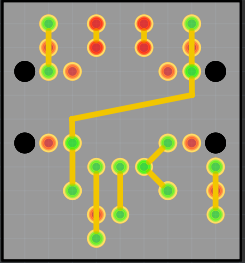

 . Most boards should have a ton of 5V pins on aux I/O.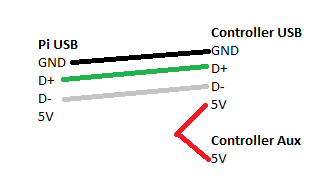
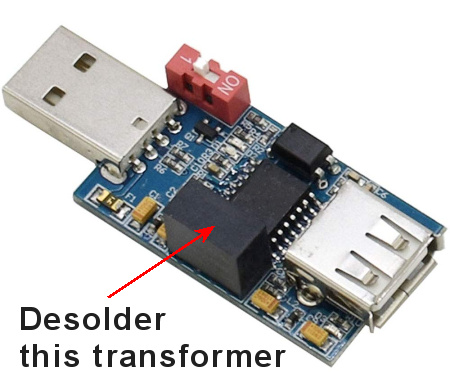 - available on Amazon, ebay, AliExpress, etc...